

Markdown to Word
Monaco editor, formatting toolbar, live paginated preview, and export to .docx or PDF with tables, code blocks, images, and embedded diagrams.
Product
Markdownyi turns AI and LLM markdown into client-ready Word documents, PDFs, and UML diagrams with a live A4 preview, Monaco editor, Mermaid and PlantUML support, Word-to-markdown reverse conversion, and a free 50 MB personal drive - a browser-native workspace between markdown drafts and deliverables stakeholders can review in Microsoft 365.

Markdownyi is a browser workspace between AI-generated markdown and client-ready deliverables. Paste or write markdown, tune Word-style formatting with a live paginated A4 preview, embed Mermaid and PlantUML diagrams, and export editable .docx or PDF files - without installing Pandoc, LaTeX, or desktop converters.
The product is AI-ready by design: draft in ChatGPT, Claude, Gemini, Copilot, or any LLM, then finish layout, tables, code blocks, images, and diagrams in Markdownyi before handoff. A free tier includes markdown-to-Word, Word-to-markdown reverse conversion, the UML editor, and 50 MB of personal file storage with email verification and no credit card.
Three tools share one drive: convert markdown to Word, upload .docx back to clean markdown for re-prompting or git workflows, and render diagram source to SVG, PNG, or PDF for embedding in documents. XSS-sanitized rendering keeps LLM output safe to preview before export.
Consultants, developers, students, and documentation teams use Markdownyi when good markdown must become a file someone can comment on, track changes in, archive, or send through normal Microsoft 365 approval workflows.
Markdownyi closes the gap between LLM drafts and stakeholder-ready files: live preview catches table overflow, code wrapping, and uneven headings before a reviewer opens Word, so technical content keeps structure on the way to approval.
Real screens from the editor, Word formatting panel, and diagram workspace at markdownyi.com.
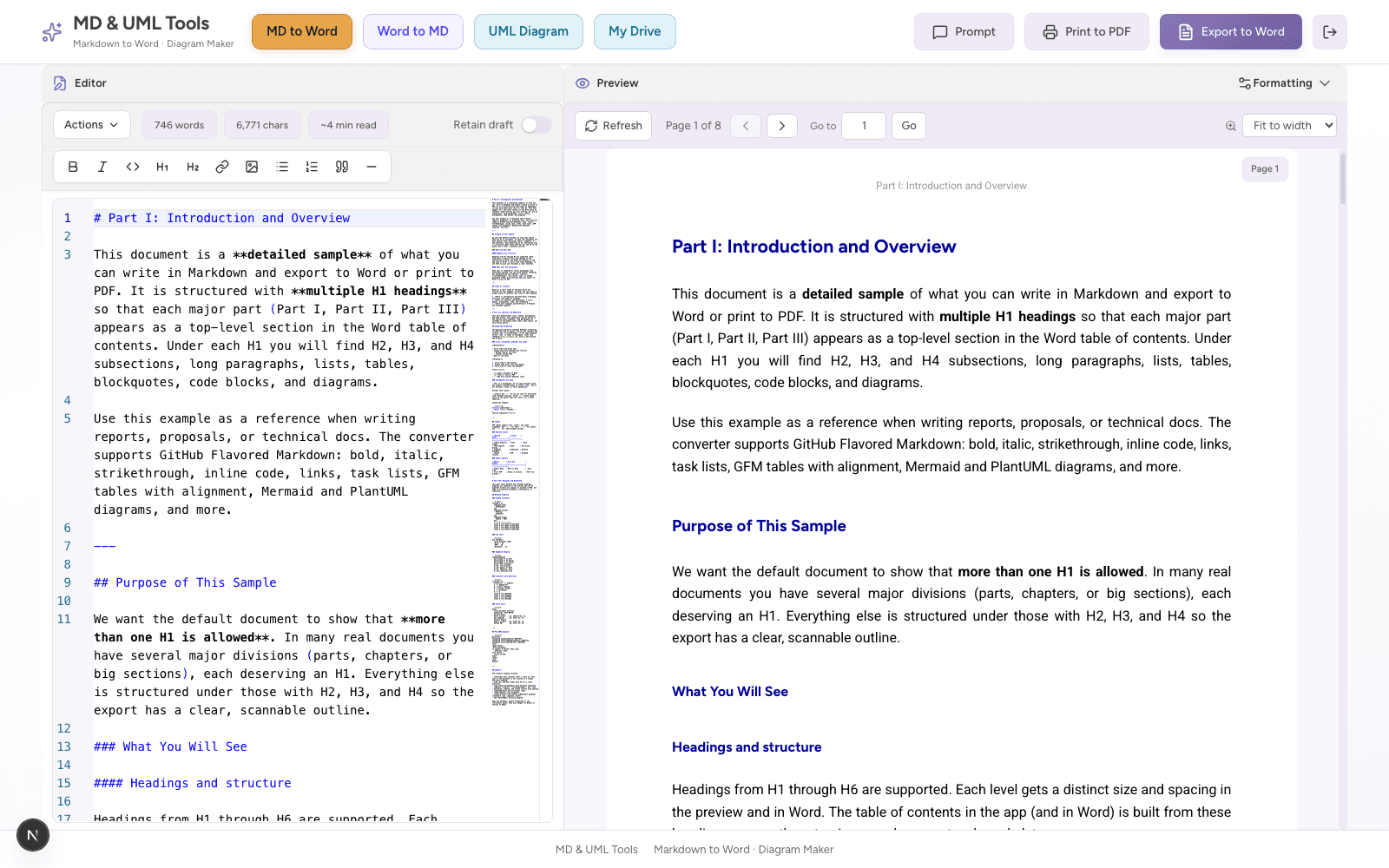
Write markdown on the left and inspect paginated A4 output on the right before you export - the core markdown-to-Word workflow.
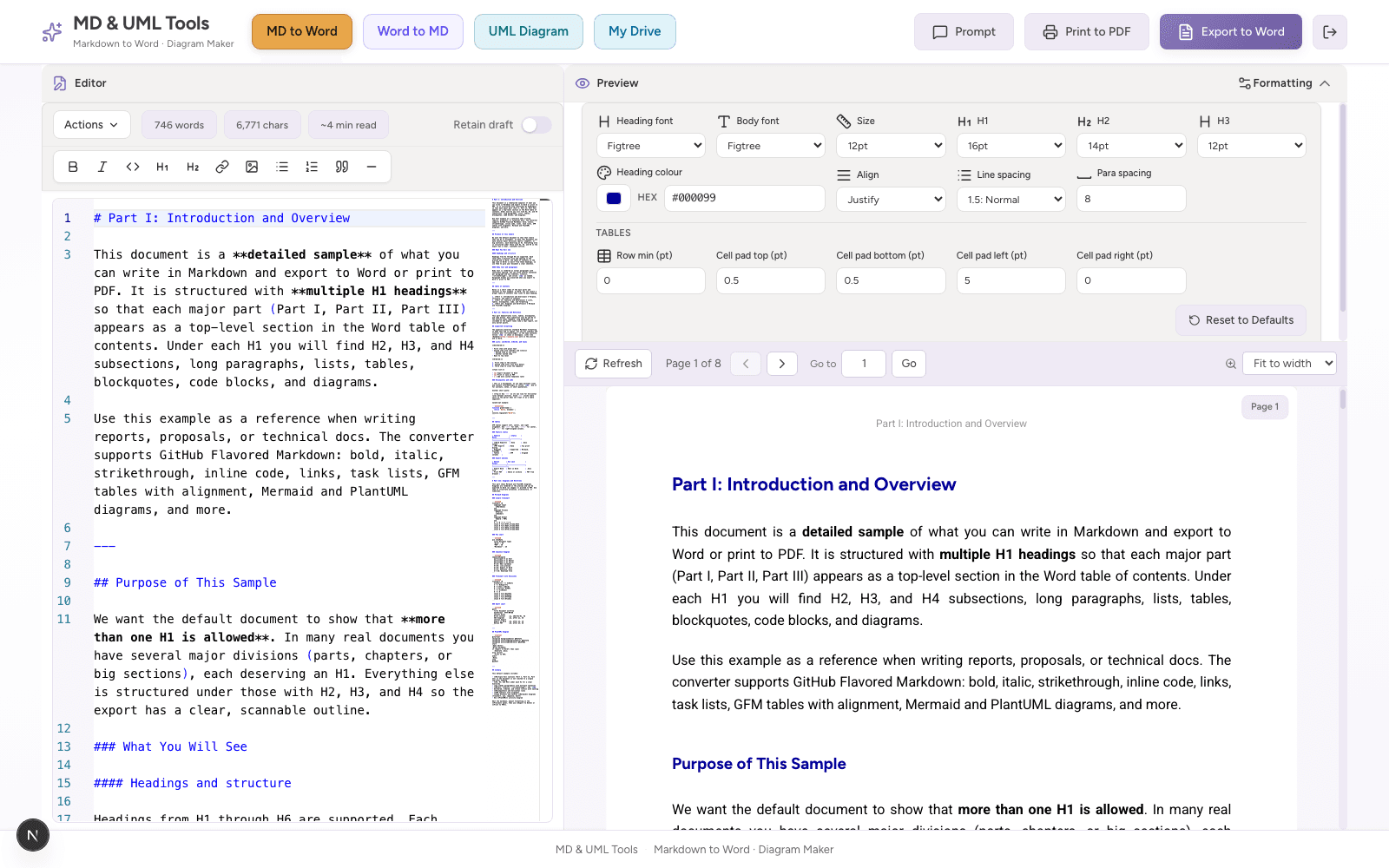
Tune fonts, heading sizes, spacing, alignment, heading colours, and table padding so the .docx is readable and reviewable.
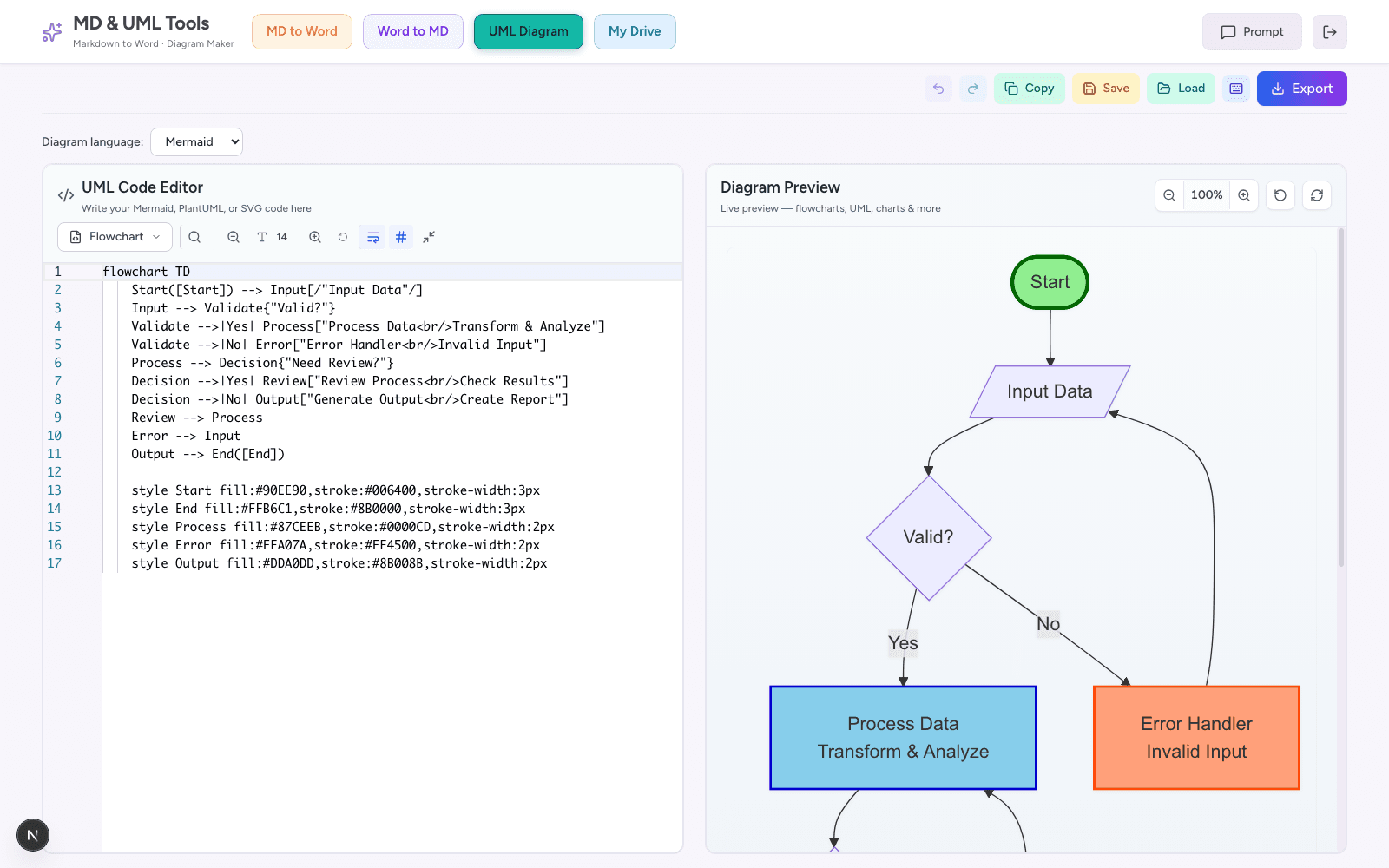
Edit text-based diagram source, preview the rendered visual, then export or embed diagrams straight into Word from markdown.
Convert, diagram, and reverse-engineer documents without leaving the browser.
Monaco editor, formatting toolbar, live paginated preview, and export to .docx or PDF with tables, code blocks, images, and embedded diagrams.
Upload a .docx and convert to clean markdown with images - ideal before re-prompting an AI or moving content to git.
PlantUML and Mermaid editor with zoom, themes, and SVG, PNG, or PDF export, plus embed paths into Word documents.
Fix layout issues before export: tables, diagrams, code blocks, and heading rhythm stay visible while you edit.
Works with ChatGPT, Claude, Gemini, Copilot, Perplexity, and any model that outputs markdown - paste, polish, export.
Free accounts store exports and works in progress in the cloud so you can resume on another machine without resending files.
Technical reports keep readable code blocks with highlighting that survives the trip into Word or PDF.
Browser-native alternative to Pandoc CLI for day-to-day human review loops - preview, fix formatting, download.
Markdownyi helps developers, consultants, students, and documentation teams turn AI-assisted drafts into files reviewers can open, comment on, and approve without rebuilding formatting by hand.
Most markdown-to-Word problems appear only after the file is opened: tables overflow, diagrams lose context, code blocks wrap badly, and AI-generated headings feel uneven. Markdownyi keeps a Word-style preview visible while you edit so layout issues are fixed before the document reaches a reviewer.
That makes the workflow useful for proposals, implementation plans, API documentation, architecture notes, classroom submissions, research reports, and internal operating guides. Markdown remains the working format while the exported Word or PDF becomes the handoff artifact.
Bring-your-own-AI is intentional. Generate structured markdown in your favorite model, paste into Markdownyi, tune fonts and spacing, fix tables and diagrams, then export. You keep model choice and prompt strategy while Markdownyi owns the conversion fidelity and preview loop.
Reverse Word-to-markdown conversion supports the round trip consultants need: receive tracked changes in Word, convert back to markdown, re-prompt or commit to git, and regenerate a polished export without manual retyping.
Straight answers for consultants, developers, and documentation leads evaluating markdown conversion tools.
Yes. Free accounts include markdown to Word, Word to markdown, the UML editor, and 50 MB of personal file storage. Email verification is required; no credit card is needed.
Yes. Generate markdown in ChatGPT, Claude, Gemini, or any LLM, paste into Markdownyi, fix layout in the live preview, and export Word or PDF.
Yes. Author diagram source in the editor, preview the render, and embed diagrams into documents exported from markdown.
No. Markdownyi runs in the browser with no CLI or local installs required for the core conversion workflow.
Create a free account at markdownyi.com and start with markdown to Word or upload a .docx for reverse conversion.
A simple path from rough markdown to a file your team can review in Word.
Prompt your model for markdown. Include Mermaid or PlantUML blocks when you need diagrams in the same deliverable.
Open Markdownyi, paste content, tune fonts and layout, and fix markdown with the editor while watching paginated A4 output.
Download .docx for Track Changes and comments, or print to PDF. Store every version on your 50 MB drive.
Upload edited Word files back to markdown before git commits or another AI pass without manual retyping.
Pair Markdownyi with platform and delivery services for team rollouts.
Governed LLM programs, evaluation harnesses, and copilot patterns when AI drafts feed regulated documentation.
AI solutionsCustom portals, client extranets, and branded document workflows that extend Markdownyi patterns.
Web app developmentWarehouse feeds and analytics when document events and export telemetry must land in enterprise BI.
Data and AIIdentity, sanitization review, and secure SDLC when documentation tools handle sensitive client content.
CybersecurityCreate a free account at markdownyi.com, paste markdown from your LLM, and export a Word file your reviewers can use. Neojn can also discuss team storage, branding, SSO, or enterprise deployment when you contact us.